Updating the status of a catalog session
The statuses used for your catalog procedures are custom configured for your company. Segregating the workflow into statuses provides the framework for tagging fields as required at different stages of cataloging and for setting custom user permissions for each status. The statuses, required fields and user roles are configured according to your company requirements.
As your team works through the cataloging steps, the catalog session progresses through the statuses as defined for your company. To change the status of a session, you must have permission included in your security profile (as set by your administrator).
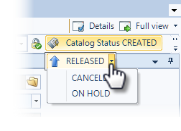 The status of a catalog session displays in the upper right corner of a catalog session in the edit mode. To update the status of a catalog session, click the catalog status in the upper right corner. The statuses that you have permission to change will display. Additional statuses may be available in a drop-down menu. Click the new status and the session updates immediately. If the catalog session has notifications associated to the status, the notifications send automatically to the designated users.
Typical statuses for a New Item Catalog session include:
- Created: New catalog session is ready for entering information and adding files and media.
- Released: Information has been added and items are ready for cataloging.
- In-progress: Catalog session has been accepted and activities are in progress.
- Completed: Catalog session is ready for quality control review.
- Uploaded: Files are ready to be moved to media and synchronized.
- Closed: Files have been synchronized and moved to production.
- Cancelled: Catalog Session has been cancelled.
- On Hold: Catalog Session has been placed on hold.