Select Version of EA Desktop:
Note:
Access to Management section requires the correct user security settings.
Managing the administration and configuration for different areas of Exploration Archives requires access to the modules in the Management area.
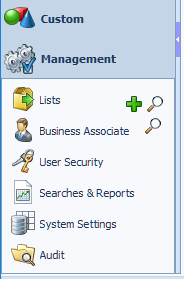
The Management modules include:
- Lists: Maintains a list of seismic, file or media items to use in a future workflow.
- Business Associate: Record and save client information for access from other modules.
- User Security: Set restrictions and permissions for the user and user groups.
- Searches and Reports: Create searches and reports, and specify the data to include in the results.
- System Settings: Configure all aspects of system settings. Set the values to display in designated data fields. Specify the data pairs to use for displaying data from the database in an Exploration Archives field. Customize the modules, enter the column headings, specify the fields to hide and display.
- Audit: Configure the audit grids.