Select Version of EA Desktop:
Exploration Archives provides detailed information about your seismic records to help you make decisions before requesting or editing data.
The key areas for searching data are in the Search module and the Asset Management modules: Seismic, File and Media.
The information that displays in the Search results are read-only. The results from the Asset Management searches populate in the modules with the ability to manipulate data and access to related records .
To search from the Search module in the Workspace, click Select a new search and access your custom searches.
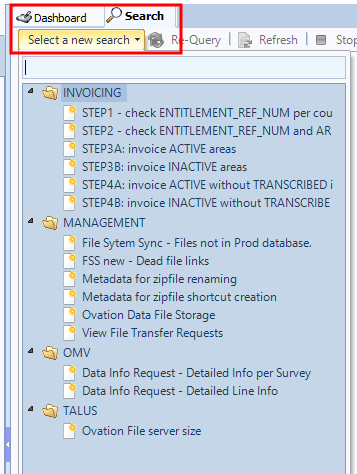
Your administrator creates the custom searches and determines the details to display in the results.
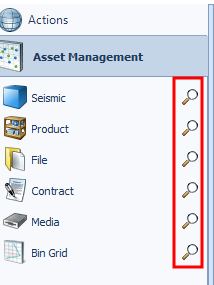
To search from the Asset Management modules, click the search icon next to the Seismic, File or Media module in the Navigation panel. The details that display in these results are controlled by the module settings.
Each search option has unique capabilities. As you use the different searches, you will become familiar with the various methods of searching and the benefits of each.
For more information on searches review these topics:
Exploration Archives provides detailed information about your seismic records to help you make decisions before requesting or editing data.
The key areas for searching data are in the Search module and the Asset Management modules: Seismic, File and Media.
The information that displays in the Search results are read-only. The results from the Asset Management searches populate in the modules with the ability to manipulate data and access to related records .
To search from the Search module in the Workspace, click Select a new search and access your custom searches.
Your administrator creates the custom searches and determines the details to display in the results.
To search from the Asset Management modules, click the search icon next to the Seismic, File or Media module in the Navigation panel. The details that display in these results are controlled by the module settings.
Each search option has unique capabilities. As you use the different searches, you will become familiar with the various methods of searching and the benefits of each.
For more information on searches review these topics: