Select Version:
You can import data from a CSV file that contains seismic data into Arc GIS Pro.
To add data from a CSV file :
-
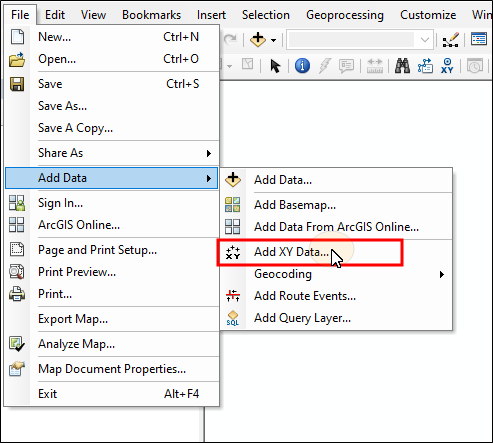
From the File Menu select Add Data>Add XY Data... . The Add XY Data dialog appears.
-
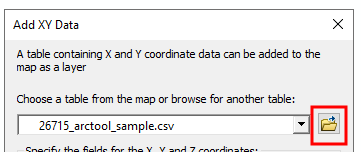
Click browse and navigate to the location the CSV file is located. Select it then click Add. The CSV file will populate the table field.
-
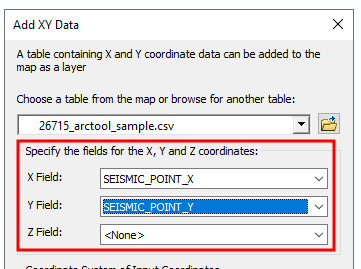
Select the appropriate values from the drop-down lists for the X Field, Y Field, and Z Field.
-
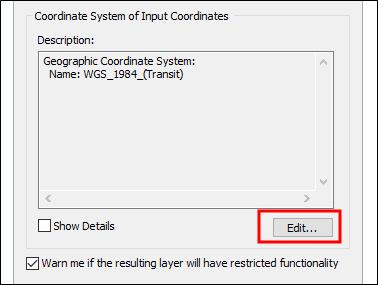
Set the coordinate system for the points. Click Edit... and select the coordinate system from the list then click OK
 Warning:
Ensure that any other layers, including the base map are using the same coordinate system.
-
Click OK. The points will appear on the map, and a new layer will be added.
You can import data from a CSV file that contains seismic data.
To add data from a CSV file:
-
From the File Menu select Add Data>Add XY Data... . The Add XY Data dialog appears.
-
Click browse and navigate to the location the CSV file is located. Select it then click Add. The CSV file will populate the table field.
-
Select the appropriate values from the drop-down lists for the X Field, Y Field, and Z Field.
-
Set the coordinate system for the points. Click Edit... and select the coordinate system from the list then click OK
Warning:Ensure that any other layers, including the base map are using the same coordinate system.
-
Click OK. The points will appear on the map, and a new layer will be added.