Select Version:
Exploration Archives Navigation Loader is a plug-in for loading geometry into Exploration Archives. Exploration Archives Navigation Loader communicates with Esri® ArcGIS Pro™ to load new seismic geometry or replace existing geometry.
The following is required for using Exploration Archives Navigation Loader:
-
Esri ArcGIS Pro 2.4 – 2.6
- Shape file (.shp) or csv file accessible for loading into ArcGIS Pro
- Installation of Exploration Archives Tools forArcGIS Pro
- Access to Exploration Archives
As of this release Esri® ArcMap® is no longer supported.
To open Navigation Loader:
- Open Esri ArcGIS Pro.
- Load the points into ArcMap using a file type that ArcMap supports. If you want to load selected features, select the features using the ArcMap selection tool .
- Click the Exploration Archives icon in the toolbar to open Tools.
- The Exploration ArchivesNavigation Loader opens in a new window.
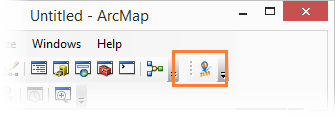
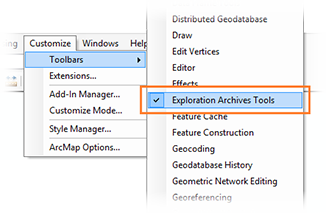
To activate the Exploration Archives icon in ArcGIS Pro, click Customize in the ArcGIS Pro menu bar. Point to Toolbars and select Exploration Archives Tools.
Exploration Archives Navigation Loader is a plug-in for loading geometry into Exploration Archives. Exploration Archives Navigation Loader communicates with Esri® ArcMap™ to load new seismic geometry or replace existing geometry.
The following is required for using Exploration Archives Navigation Loader:
- Esri® ArcMap® 10.4 – 10.6
-
Esri ArcGIS Pro 2.4 – 2.6
- Shape file (.shp) or csv file accessible for loading into ArcMap
- Installation of Exploration Archives Tools for ArcMap
- Access to Exploration Archives
To open Navigation Loader:
- Open Esri ArcMap.
- Load the points into ArcMap using a file type that ArcMap supports. If you want to load selected features, select the features using the ArcMap selection tool .
- Click the Exploration Archives icon in the toolbar to open Tools.
- The Exploration Archives Navigation Loader opens in a new window.
To activate the Exploration Archives icon in ArcMap, click Customize in the ArcMap menu bar. Point to Toolbars and select Exploration Archives Tools.
Exploration Archives Tools for ArcMap is a plug-in for loading geometry into Exploration Archives. Exploration Archives Tools for ArcMap communicates with Esri® ArcMap™ to load new seismic geometry or replace existing geometry.
The following is required for using Exploration Archives Tools for ArcMap:
- Esri® ArcMap® 10.4 – 10.6
-
Esri ArcGIS Pro 2.4 – 2.6
- Shape file (.shp) or csv file accessible for loading into ArcMap
- Installation of Exploration Archives Tools for ArcMap
- Access to Exploration Archives
To open Tools for ArcMap:
- Open Esri ArcMap.
- Load the points into ArcMap using a file type that ArcMap supports. If you want to load selected features, select the features using the ArcMap selection tool
 .
. - Click the Exploration Archives icon in the toolbar to open Tools.
- The Exploration Archives Tools for ArcMap opens in a new window.
To activate the Exploration Archives icon in ArcMap, click Customize in the ArcMap menu bar. Point to Toolbars and select Exploration Archives Tools.