Select Browser Version:
You can add records to the search results grid using the following tools:
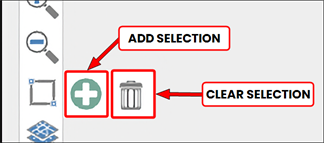
Once data has been selected on the map, click Add Selection. The selected items will be added to the results grid.
To clear the selection from the map, click Clear selection.
The Seismic tab in the Grid Panel is your working space for compiling a list of items to add to an order. Adding seismic to the grid displays the associated details of the seismic.
|
|
Add: To add seismic to the grid, select the target items on the map then on the map toolbar click Add. Selected lines become highlighted. When added to the grid, the highlighting changes colour.
|
|
|
Clear: To remove all items listed in the Seismic grid, on the Seismic grid toolbar click Clear.
|

|
Export: The Export function exports grid information to various document types, including Excel®. |

