Select Version of EA Desktop:
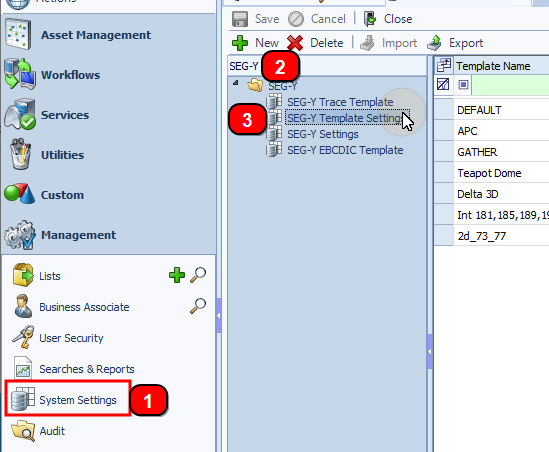
The templates are defined in the SEG-Y Template Settings in the System Settings.
The first step to specify the scan settings:
-
Under Management in the navigation panel, click System Settings.
-
Filter the settings to only show SEG-Y.
-
From the list, select SEG-Y Template Settings. The SEG-Y Template Settings grid opens.
-
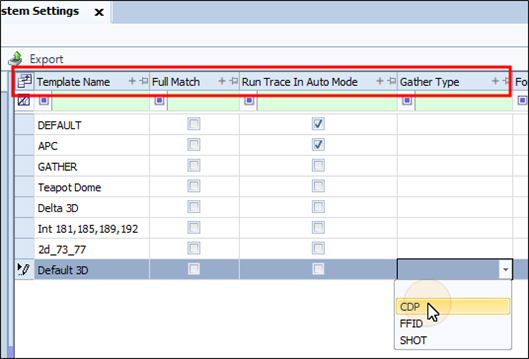
Click New. The grid opens with four columns available to specify settings.
-
In the Template Name column, enter an appropriate name.
-
In the Full Match column, select to apply to the EBCDIC Template. This setting does not apply to the Trace Template.
Note:Full Match scans for an exact character match of the data. If an exact match is not found, the scan results indicate as invalid data.
-
In the Run Trace In Auto Mode column, select to apply to the Trace Template. This setting does not apply to the EBCDIC Template
The Trace Template specifies the location of the CDPX-CDPY and the inline-crossline. Select Run Trace In Auto Mode if your template has multiple locations to search for a data match. Auto Mode subsequently scans all locations listed in the template until a match is found. Without Auto Mode, the scan checks only the first instance of each location.
-
For the Trace Template, select the Gather Type if applicable. If left blank, the process scans files as pre-stack or post-stack.