Select Version of EA Desktop:
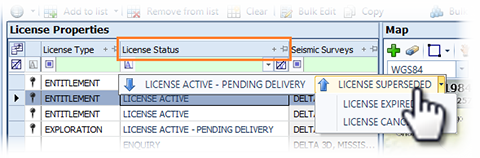
The license status indicates the progress of a license. To update the status of a license, locate the license in the License Properties grid of the License module. Click in the cell of the License Status column to open the status options. Click the new status for the license and Save.
To access this functionality, you must have permission for changing a license status added to your profile. Your administrator sets the user securities for the license status functionality.
Note:
The status options available are restricted by your company's workflow. Not all statuses are available from the current status of a license.