Select Version of EA Desktop:
The Data Request module in Exploration Archives Desktop is used for ordering products and tracking the movement of your data.
With a variety of features and customizable fields, you can easily modify the procedures you perform to best suit your company's workflow.
Typically, completing a request for data includes activities to be performed outside of Exploration Archives.The Data Request module provides the following statuses to manage the stages of your workflow:
- Building: Information is being entered and products are being added to the request.
- Submitted: Information is complete and the request has been submitted for approval.
- Approved: Information has been reviewed and the request has been approved.
- In-progress: The requested products are being compiled and are in transit for delivery.
- Delivered: The requested products have been delivered to the destination.
- Closed: Confirmation has been received that the products arrived at the destination.
The statuses are also configured as predefined searches. To locate a data request of a particular status, use the search function next to Data Request in the navigation panel under Workflows.
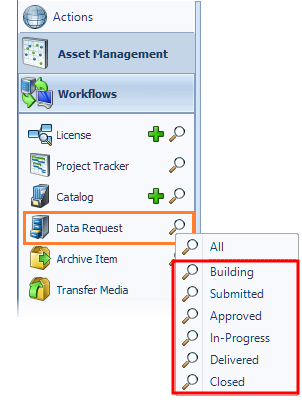
The search results will appear in the Data Request Properties grid.
The Data Request module in Exploration Archives Desktop is used for ordering products and tracking the movement of your data.
-
Created a new summary screen such that a user can search for one or many Data Requests, and view all details without having to open an individual Data Request in Edit Mode.
-
Added the ability to add staging files and media to a Data Request. This is helpful for cases were files or media may need to be sent to a third party prior to being uploaded to production.
-
Added a SEG-Y Status column to the products grid.
-
Added a SEG-Y Snapshot” menu option to products grid.
-
Added multiple Open selected menu options to the products grid to allow opening of selected files and media in both production and staging.
With a variety of features and customizable fields, you can easily modify the procedures you perform to best suit your company's workflow.
Typically, completing a request for data includes activities to be performed outside of Exploration Archives.The Data Request module provides the following statuses to manage the stages of your workflow:
- Building: Information is being entered and products are being added to the request.
- Submitted: Information is complete and the request has been submitted for approval.
- Approved: Information has been reviewed and the request has been approved.
- In-progress: The requested products are being compiled and are in transit for delivery.
- Delivered: The requested products have been delivered to the destination.
- Closed: Confirmation has been received that the products arrived at the destination.
The statuses are also configured as predefined searches. To locate a data request of a particular status, use the search function next to Data Request in the navigation panel under Workflows.
The search results will appear in the Data Request Properties grid.
The Data Request module in Exploration Archives Desktop is used for ordering products and tracking the movement of your data.
With a variety of features and customizable fields, you can easily modify the procedures you perform to best suit your company's workflow.
Typically, completing a request for data includes activities to be performed outside of Exploration Archives.The Data Request module provides the following statuses to manage the stages of your workflow:
- Building: Information is being entered and products are being added to the request.
- Submitted: Information is complete and the request has been submitted for approval.
- Approved: Information has been reviewed and the request has been approved.
- In-progress: The requested products are being compiled and are in transit for delivery.
- Delivered: The requested products have been delivered to the destination.
- Closed: Confirmation has been received that the products arrived at the destination.
The statuses are also configured as predefined searches To locate a data request of a particular status, use the search function next to Data Request in the navigation panel under Workflows.