Select Version of EA Desktop:
Use the main File Properties grid to assign a child file and use the Child File tab in the Related Records area to view the results.
Exploration Archives accommodates a many-to-many relationship for parent and Related Records. A parent record can have multiple children and a child record can have multiple parents.
To assign a child to one or more items:
-
Use one of the following methods to select the item(s) in the Grid to create a child relationship:
- Click to select a single row.
- To select multiple consecutive rows, click and drag in the leader column in the grid.
-
To select multiple individual rows, press Ctrl while clicking to select.
- Right-click on a selected row to open the context menu.
- Point to Additional tools.
-
Select Assign child.
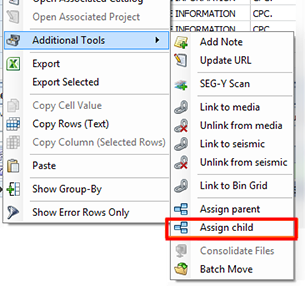
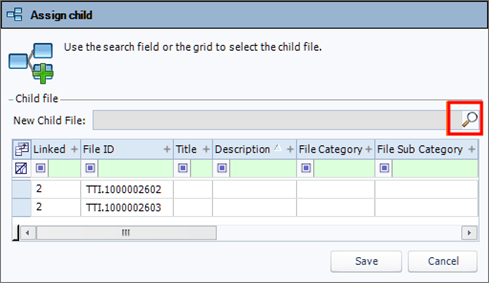
The Assign child window opens.
-
Either select an item in the grid or search for the child item(s) to assign and select.
-
If you select an item in the grid, that item will become the child of the others in the Grid.
-
If you search and select an item, the new item will become the child of the others in the Grid.
-
-
Click Save.
The assigned