Select Version of EA Desktop:
After passing quality control (QC), the session is ready for you to upload to production. The data becomes available to users after being uploaded.
The Catalog Status needs to be set to Completed.
To upload to production:
-
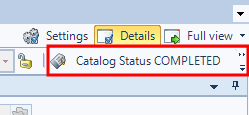
Click the Catalog Status when Completed.
-
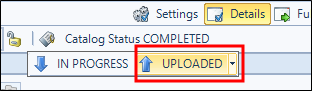
Click Uploaded.
-
The status changes to Uploaded.
The files in an Uploaded catalog session are available for moving to Production. Refer to Move files to production (Batch Move).
After passing quality control (QC), the session is ready for you to upload to production. The data becomes available to users after being uploaded.
The Catalog Status needs to be set to Completed.
To upload to production:
-
Click the Catalog Status when Completed.
-
Click Uploaded.
-
The status changes to Uploaded.
The files in an Uploaded catalog session are available for moving to Production. Refer to Move files to production (Batch Move).