Select Version of EA Desktop:
Depending on your company workflow, contract files can be added from the Project Tracker module or from the Contract module.
Before adding the contract, you must have at least one seismic record ready to link to the contract.
To add a new contract in Project Tracker use one of the following 2 methods:
 Create a New Contract:
-
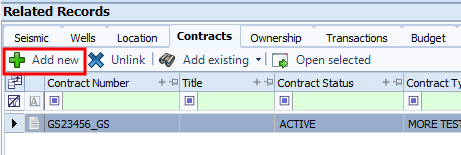
In the Related Records panel, select the Contracts tab.
-
Click Add New.
 Tip:
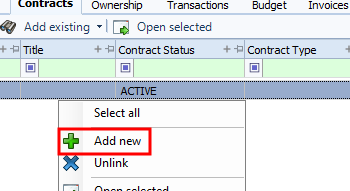
Tip:Alternatively, you can right-click anywhere in the Contract grid to open the context menu then click Add New.
-
The Create contract and link to seismic window opens with several tabs available for entering associated information.
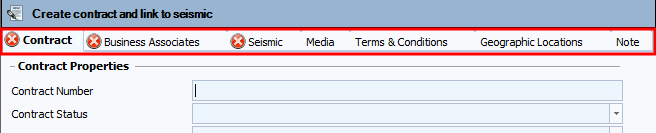
Each tab has a specific function
-
Contract: you enter the Information about the contract. Mandatory fields are Highlighted with an X. The Contract tab is required to be filled out before you save.
-
Business Associates: See: Assign or add a business associate
-
Seismic: See: Linking seismic to a new contract
-
Media: See: Add the contract media
-
Terms and Conditions: This tab allows you to attach Terms and Conditions to the contract. See: Add Terms and Conditions
-
Geographic Locations: You can add different Geographic Locations . See: Add Geographic Locations
-
Note:See: Add a note with a contract
Add an Existing Contract
-
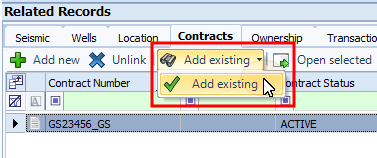
In the Related Records panel, select the Contracts tab.
-
Click Add Existing from the drop-down.
-
In the Search Database Records window, enter your search criteria, then click Search.
-
From the search results, click on the contract or contracts to add, then click OK.