Select Version of EA Desktop:
Exploration Archives Navigation Loader is a plug-in for loading geometry into Exploration Archives. Exploration Archives Navigation Loader communicates with Esri® ArcGIS Pro™ to load new seismic geometry or replace existing geometry.
The following is required for using Exploration Archives Navigation Loader:
-
Esri ArcGIS Pro 3.x
- Shape file (.shp) or csv file accessible for loading into ArcMap
- Installation of Exploration Archives Tools for ArcMap
- Access to Exploration Archives
To open Navigation Loader:
- Open Esri ArcMap.
- Load the points into ArcMap using a file type that ArcMap supports. If you want to load selected features, select the features using the ArcMap selection tool.
- Click the Exploration Archives icon in the toolbar to open Tools.
- The Exploration ArchivesNavigation Loader opens in a new window.
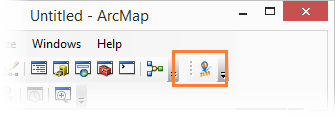
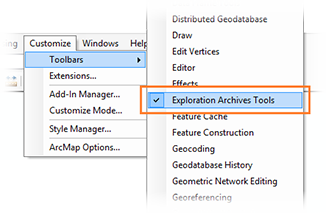
To activate the Exploration Archives icon in ArcMap, click Customize in the ArcMap menu bar. Point to Toolbars and select Exploration Archives Tools.
Exploration Archives Navigation Loader is a plug-in for loading geometry into Exploration Archives. Exploration Archives Navigation Loader communicates with Esri® ArcMap™ to load new seismic geometry or replace existing geometry.
The following is required for using Exploration Archives Navigation Loader:
- Esri® ArcMap® 10.4 – 10.6
-
Esri ArcGIS Pro 2.4 – 2.6
- Shape file (.shp) or csv file accessible for loading into ArcMap
- Installation of Exploration Archives Tools for ArcMap
- Access to Exploration Archives
To open Navigation Loader:
- Open Esri ArcMap.
- Load the points into ArcMap using a file type that ArcMap supports. If you want to load selected features, select the features using the ArcMap selection tool.
- Click the Exploration Archives icon in the toolbar to open Tools.
- The Exploration Archives Navigation Loader opens in a new window.
To activate the Exploration Archives icon in ArcMap, click Customize in the ArcMap menu bar. Point to Toolbars and select Exploration Archives Tools.
Exploration Archives Navigation Loader is a plug-in for loading geometry into Exploration Archives. Exploration Archives Navigation Loader communicates with Esri® ArcMap™ to load new seismic geometry or replace existing geometry.
The following is required for using Exploration Archives Navigation Loader:
- Esri® ArcMap® 10.4 – 10.6
-
Esri ArcGIS Pro 2.4 – 2.6
- Shape file (.shp) or csv file accessible for loading into ArcMap
- Installation of Exploration Archives Tools for ArcMap
- Access to Exploration Archives
To open Navigation Loader:
- Open Esri ArcMap.
- Load the points into ArcMap using a file type that ArcMap supports. If you want to load selected features, select the features using the ArcMap selection tool.
- Click the Exploration Archives icon in the toolbar to open Tools.
- The Exploration Archives Navigation Loader opens in a new window.
To activate the Exploration Archives icon in ArcMap, click Customize in the ArcMap menu bar. Point to Toolbars and select Exploration Archives Tools.