Select Version of EA Desktop:
The Assets panel of the Catalog module is a working space for searching and linking seismic (and wells) to files in a catalog session. You can link seismic to any file.
To locate the seismic to link to a file, use the Assets panel:
-
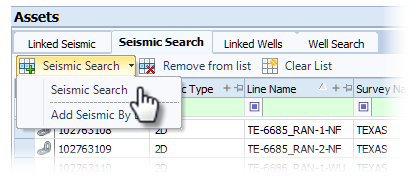
In the Seismic Search tab of the Assets panel, click Seismic Search and select a search category from the drop-down menu.
-
The search window opens. Enter your search criteria then click Search.
-
The items add to the Seismic Search grid.
The Catalog module offers 2 methods for linking files and seismic; a drag and drop action and a context menu command.
 Option 1: Use drag and drop to link files to seismic
The drag and drop method is reciprocal. Dragging from the Seismic Search tab to the Files grid produces the same results as dragging from Files to Seismic Search.
-
Click to select an item from the Seismic Search tab.
-
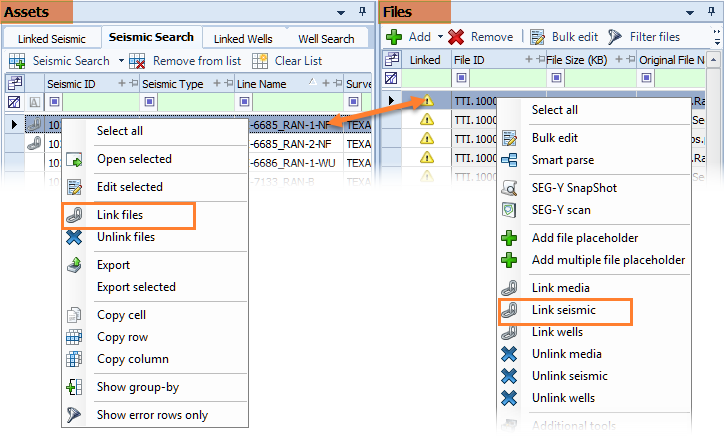
Click and hold the seismic. Drag and drop to the file in the Files grid.
The Linked columns update in each grid to show the linked icon.
Option 2: Use the context menu to link files to seismic
The linking action is reciprocal. The Link files action from the Seismic Search tab and the Link seismic action from the Files grid produce the same results.
- Click to select the seismic in the Seismic Search tab.
- In the Files grid, select the item(s) associated to the seismic.
- Right-click in the Seismic Search tab to open the context menu. Select Link files.
The Linked columns update in each grid to show the linked icon.
The Links tab in the Related Records panel displays the seismic linked to a file selected in the Files grid.
To link files to seismic using the file name and/or file path, refer to: Use Smart Parse to extract metadata.