Select Version of EA Desktop:
The Fees tab includes the option of creating a custom fee entry.
To create a custom fee:
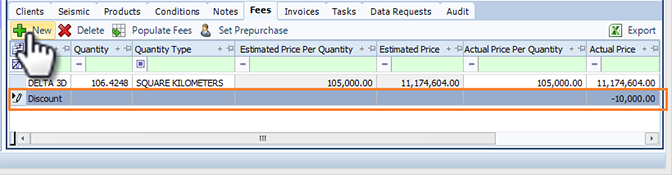
- Click New. A new row with empty cells adds to the grid.
- Double-click a cell to enter new information.
- Click Save in main toolbar.
The Fees tab includes the option of creating a custom fee entry.
To create a custom fee:
- Click New. A new row with empty cells adds to the grid.
- Double-click a cell to enter new information.
- Click Save in main toolbar.