Select Version of EA Desktop:
The Fees tab in the License module includes the option to cover the fees using a prepurchase amount. The prepurchase contract details must be registered with the primary client in the Business Associate module.
To set the prepurchase:
- In the Fees tab, select the item applicable for the prepurchase.
- Click Set Prepurchase. The Set Prepurchase window opens.
- In the top field, click the down arrow and select the prepurchase to apply to the license. The associated information displays as a preview in the Prepurchase Details, Available and Result areas.
- Click Save. The windows closes and the calculated amount displays in the Covered By Prepurchase column.

The Fees tab in the License module includes the option to cover the fees using a prepurchase amount. The prepurchase contract details must be registered with the primary client in the Business Associate module.
To set the prepurchase:
- In the Fees tab, select the item applicable for the prepurchase.
- Click Set Prepurchase. The Set Prepurchase window opens.
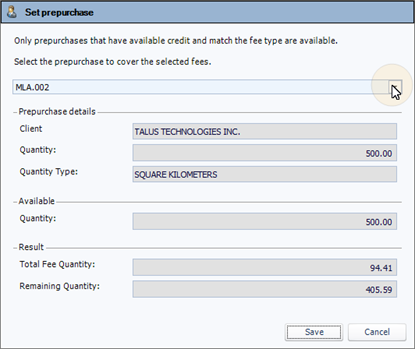
- In the top field, click the down arrow and select the prepurchase to apply to the license. The associated information displays as a preview in the Prepurchase Details, Available and Result areas.
- Click Save. The windows closes and the calculated amount displays in the Covered By Prepurchase column.