Select Version of EA Desktop:
Project Tracker accommodates workflows for adding new seismic or adding existing seismic to a project.
To add new seismic record through Project Tracker:
-
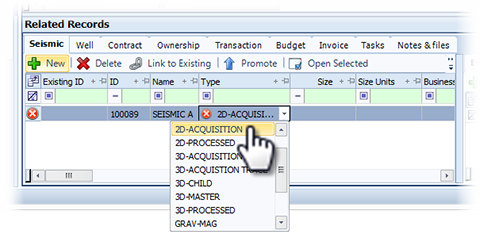
In the Related Records panel, click New.
A new row adds to the grid with an auto-generated ID. The new ID is a project-specific ID for the seismic.
-
Enter a Name.
-
Enter the remaining information for each column as applicable.
-
Click Save.
Clicking Save, saves the detail to the Seismic tab of the Related Records.
At this point, the detail is on hold until you promote the seismic to the database or link the seismic to an existing record.
 To promote new seismic to production
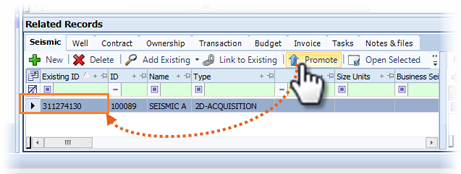
The Promote action generates a Seismic ID and makes the record available in the Seismic module.
-
Select the seismic and click Promote.
-
In the confirmation window, click Yes. A seismic ID auto-generates for the new seismic.
To link new seismic to existingAfter creating a seismic record in Project Tracker, you can link the record to seismic that already exists in Exploration Archives.
-
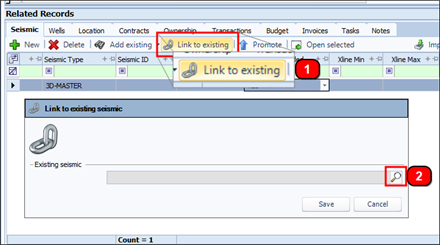
Select the seismic and click Link to Existing. The Link to Seismic window opens.
-
To find the existing seismic, click search and select a search option.
-
When the search window opens, enter your search criteria and click Search. The results open in the Select Item window.
-
Select the linking seismic and click OK.
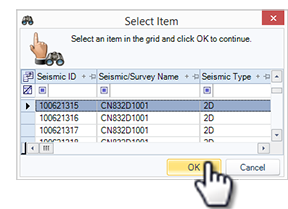
The Select Item window closes and the selected seismic ID displays in the Link to Seismic window.
-
Click Save. The seismic ID displays in the Seismic ID column of the Seismic tab and the seismic record is linked to the existing seismic.