Select Version of EA Desktop:
To manually add new seismic to Exploration Archives:
-
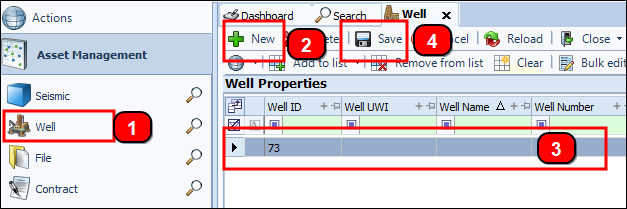
Click Well in the Navigation panel to open the module.
-
Click New . A new empty row displays in the grid.
Note:The system will auto-generate a Well ID.
-
On the empty row, fill in the cells under the respective columns. The columns for some items like Initial Class, Current Class, and Well Type are pre-configured and are populated with a drop-down list. Other fields you can can click inside the cell and manually enter data.
Tip:Use the Column chooser to hide or add other columns to the grid.
-
Click Save.
To manually add new seismic to Exploration Archives:
-
Click Well in the Navigation panel to open the module.
-
Click New and a new row displays in the grid.
Note:The system will auto-generate a Well ID.
-
On the empty row, fill in the cells under the respective columns. The columns for some items like Initial Class, Current Class, and Well Type are pre-configured and are populated with a drop-down list. Other fields you can can click inside the cell and manually enter data.
Tip:Use the Column chooser to hide or add other columns to the grid.
-
Click Save.