Select Version of EA Desktop:
You can set parent/child relationships for wells by assigning a header well:
-
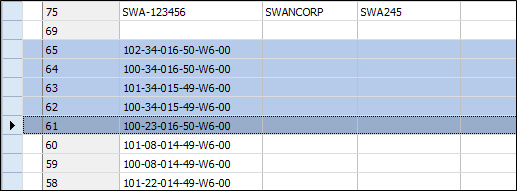
In the Well Properties grid select two or more wells by shift-clicking consecutive rows
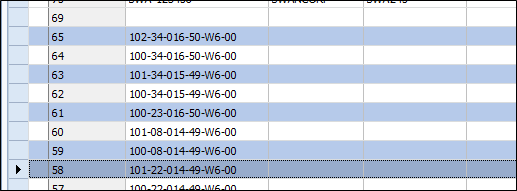
You select non-consecutive wells in the grid by holding the ctrl key then selecting the wells.
-
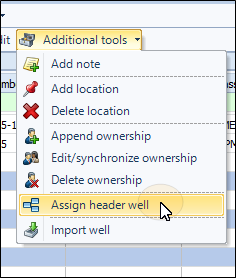
From the toolbar, select Additional Tools > Assign Header Well.
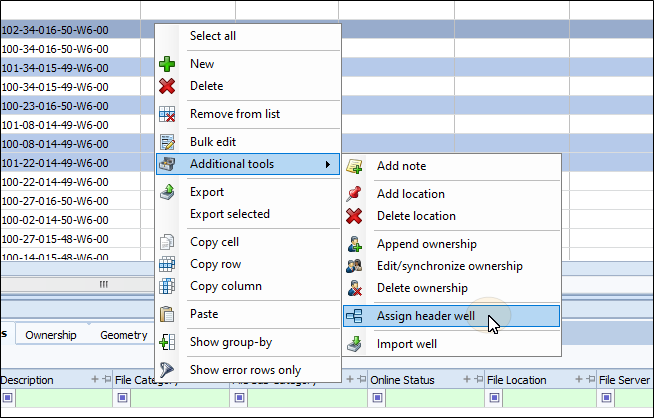
You can also right-click on the wells grid and select Additional tools > Assign Header Well from the context menu.
-
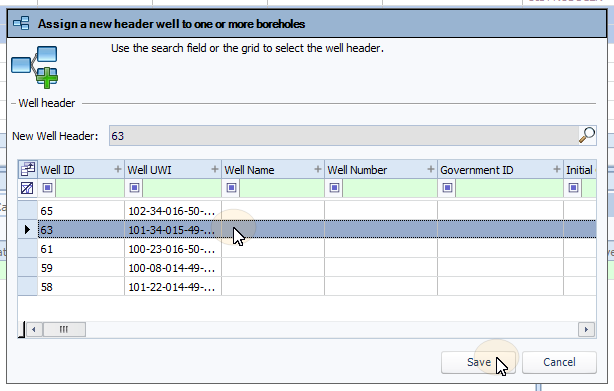
From the window that appears, assign the header well for the bore holes from the list on the grid, then click Save.
The parent/child relationship will be made and the child wells will appear in the Bores tab of the parent well
You can set parent/child relationships for wells by assigning a header well:
-
In the Well Properties grid select two or more wells by shift-clicking consecutive rows
You select non-consecutive wells in the grid by holding the ctrl key then selecting the wells.
-
From the toolbar, select Additional Tools > Assign Header Well.
You can also right-click on the wells grid and select Additional tools > Assign Header Well from the context menu.
-
From the window that appears, assign the header well for the bore holes from the list on the grid, then click Save.
The parent/child relationship will be made and the child wells will appear in the Bores tab of the parent well