Select Version of EA Desktop:
The Bin Grid module accommodates various project requirements with the ability to represent bin grid relationships. The relationship identifies a bin grid that is generated from another bin grid. The association between a parent and child bin grid is defined by your company workflow.
To assign a parent or child to one or more bin grids:
-
Select the target bin grids in Bin Grid Properties.
-
Right-click and select Assign Parent or Assign Child.
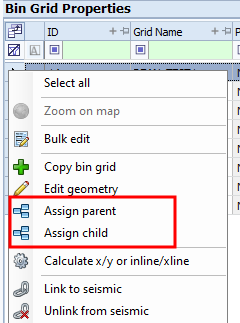
-
In the new window, search for the bin grid to assign as parent or child and click to select.
-
Click Save.
The assigned parent or child bin grid displays in the associated tab of Related Records.