Select Version of EA Desktop:
The File module is for viewing, editing and moving data. The File module offers several features and tools for editing and updating the details of your file records.
-
Added a configuration option to allow a user to download files from an alternate server by default.
-
Updated the “sum” on the “File Size” column to be in GB instead of KB.
To open items in the File module:
-
Click search next to File in the Navigation panel.
-
Select the appropriate search type and the search window will open
-
Enter your filter values and click Search.
The results open in the File module. The File Properties grid displays the information for each item. To view the Related Records for an item, click on a row in the File Properties grid and the associated details display in the Related Records tabs.
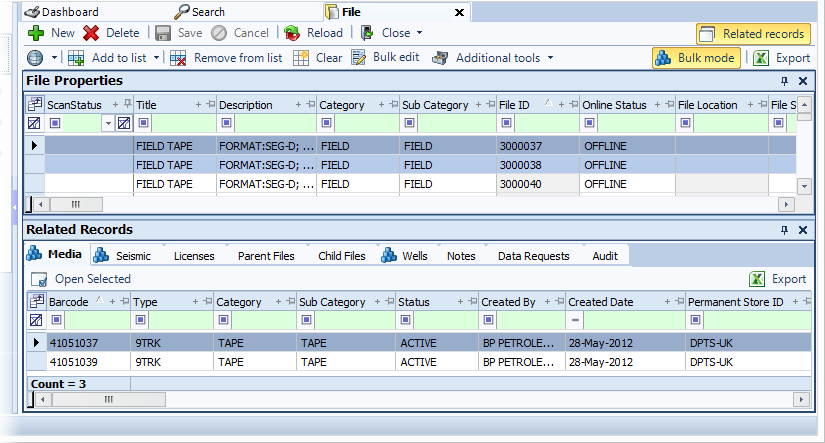
The File module is for viewing, editing and moving data. The File module offers several features and tools for editing and updating the details of your file records.
To open items in the File module:
-
Click search next to File in the Navigation panel.
-
Select the appropriate search type and the search window will open
-
Enter your filter values and click Search.
The results open in the File module. The File Properties grid displays the information for each item. To view the Related Records for an item, click on a row in the File Properties grid and the associated details display in the Related Records tabs.