Select Version of EA Desktop:
The File Properties grid displays information for records. If you have been given the appropriate permissions you can edit information in a record.
To edit an individual record:
-
Locate the item in the File Properties grid and click in a cell of the category column.
-
Depending on the data in the cell, you can manually type the information or select a property from drop-down menus.
-
When finished editing a record, click Save.
To edit one or more details that are shared across multiple records, you can use Bulk edit.
- Select the records to edit:
- To select multiple consecutive rows, click and drag in the columns in the grid.
-
To select multiple individual rows, press Ctrl+click to select the row.
-
After selecting the rows, click Bulk edit in the toolbar.
Tip: You can right-click on the selected row and click Bulk edit in the context menu.
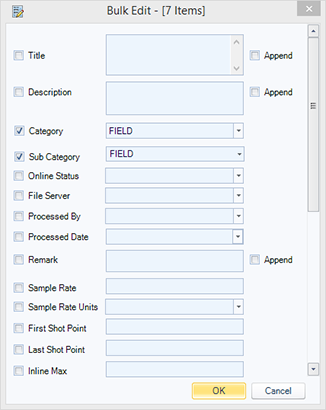
The Bulk edit window opens.
-
Enter (or select via drop-down lists) the information for each field to be updated for the selected rows.
-
In select fields you have an option to add additional information to the contents, select the Append checkbox
-
When finished, Click OK then click Save.