Select Version of EA Desktop:
SEG-Y Scan converts your SEG-Y data files into compressed replicas for quick viewing. The scanning process extracts the set of coordinates, data from the EBCDIC header, SEG‐Y attributes and SEG‐Y cataloging detail. Using the extracted data, Exploration Archives generates images that you can view using SEG-Y SnapShot.
The generated images include:
- Live trace outline for each file
- Amplitude map
- Time sections
- Time slice
- Histogram of trace sample values
Identifying the scan status
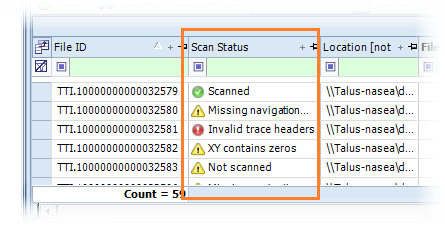
In the File module, the Scan Status column in the File Properties grid indicates whether a file has been scanned or not.
Files in a .sgy format are available for scanning and display a status in the Scan Status column as follows:
- Not Scanned: SEG-Y file has not been scanned
- Scanned : File was successfully scanned and outputs are available for viewing in SEG-Y SnapShot
- Missing Data: The scan process was unsuccessful because data is missing from the file
- Missing Navigation Data: The scan process was unsuccessful because navigation data is missing from the file
To view scanned files, refer to View files with SEG-Y Snapshot from Files module.
To scan files using SEG-Y Scan, refer to Adding files to SEG-Y Scan.