Select Version of EA Desktop:
The Invoices tab maintains the list of invoices associated to a license. This list is a reference for investigating further information.
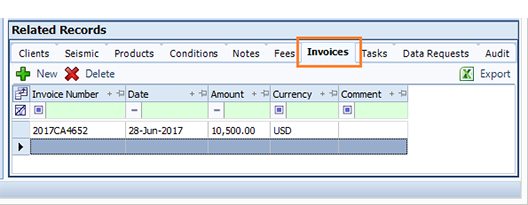
To add a reference to an invoice:
- Open the Invoices tab then click New. An empty row adds to the grid.
- In the Invoice Number column, enter the number as it appears on the invoice.
- Enter the date of the invoice in the Date column.
- Enter the total cost and currency in the Amount and Currency columns.
- Double-click the comment cell and manually enter a comment, if applicable.
- Click Save in the main toolbar.
The Invoices tab maintains the list of invoices associated to a license. This list is a reference for investigating further information.
To add a reference to an invoice:
- Open the Invoices tab then click New. A new row adds to the grid.
- In the Invoice Number column, enter the number as it appears on the invoice.
- Enter the date of the invoice in the Date column.
- Enter the total cost and currency in the Amount and Currency columns.
- Double-click the comment cell and manually enter a comment, if applicable.
- Click Save in the main toolbar.