Select Version of EA Desktop:
The Conditions tab is for recording a condition that is associated to a license. Exploration Archives automatically generates a notification reminder to the assignee according to the Action Date and Expiry Date associated to the condition.
To add a condition:
-
Open the Conditions tab and click New. A new row adds to the grid.
-
Select the Condition Type.
-
Select the Condition Status.
-
To enter the instructions, hover over the Instructions cell and click edit to open the text edit window.
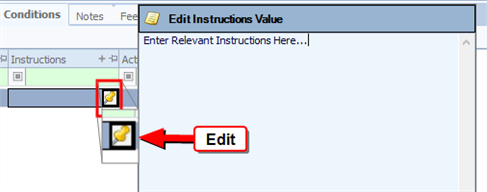
Enter the instructions and click OK.
-
Enter the Action Date and the Expiry Date.
-
Select the responsible person in the Assigned To column.
-
Click Save in the main toolbar.