Select Version of EA Desktop:
When importing records from an Excel file it’s beneficial to be able to create an import template. This tool will create a blank file that you can fill in and then use to import the records.
To create an Import template:
-
Open a Catalog session.
-
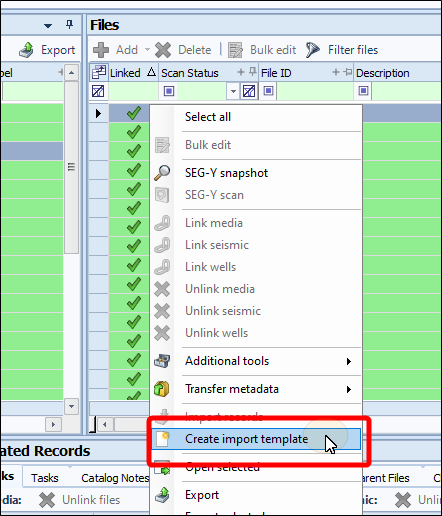
In the Files or Media panel, right click and select Create import template from the context menu.
-
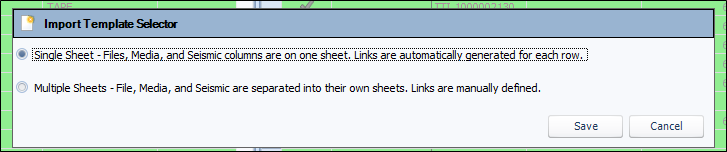
The Import Template Selector opens.
-
Select between creating a single sheet or multiple sheets. The tool will export columns that can be imported based on the configuration.
-
Click Save. The save file panel opens.
-
Navigate where you want to save the template, then select Save.
-
The template will be saved, and will open in Microsoft Excel.
-
Open a Catalog session.
-
In the Files or Media panel, right click and select Create import template from the context menu.
-
The save file panel opens.
-
Navigate where you want to save the template, then select Save.
-
The template will be saved, and will open in Microsoft Excel.