Select Version of EA Desktop:
You can assign the owners and their ownership stake to a well on the Well Properties Grid.
To assign owners to a well:
-
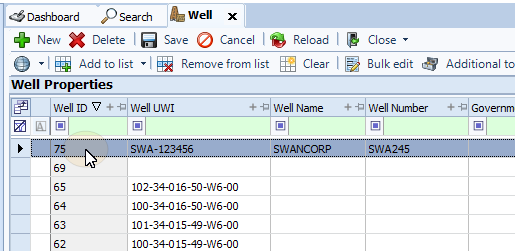
In the Well Properties panel select a well on the grid.
-
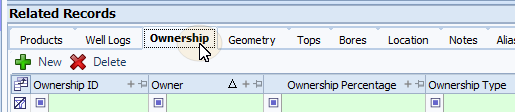
On the Related Records panel, select the Ownership tab to make it active.
-
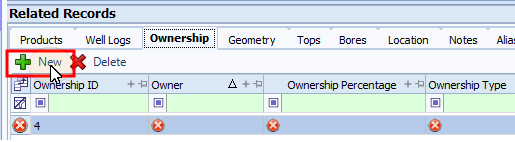
From the toolbar, click New. A blank row will appear in the grid.
 Note:
Note:An Ownership ID will be assigned to the row automatically. The circular X in each cell indicates a required information. When the fields have been filled and verified the indicator will disappear.
-
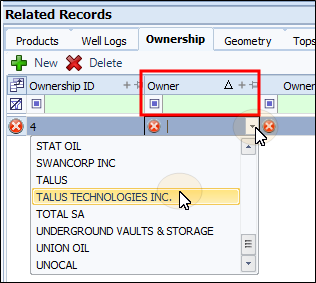
In the Owner column, select the owner from the drop-down list.
-
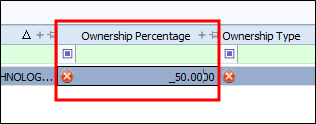
Enter the Ownership Percentage.
-
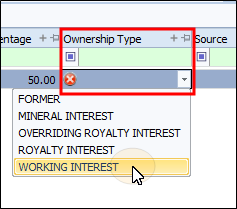
Select the Ownership Type from the drop-down list.
-
Fill out the Source and enter any Remarks by double-clicking in the respective cells and typing the data into them.
-
On the Toolbar, select Save.
You can assign the owners and their ownership stake to a well on the Well Properties Grid.
To assign owners to a well:
-
In the Well Properties panel select a well on the grid.
-
On the Related Records panel, select the Ownership tab to make it active.
-
From the toolbar, click New. A blank row will appear in the grid.
Note:An Ownership ID will be assigned to the row automatically. The circular X in each cell indicates a required information. When the fields have been filled and verified the indicator will disappear.
-
In the Owner column, select the owner from the drop-down list.
-
Enter the Ownership Percentage.
-
Select the Ownership Type from the drop-down list.
-
Fill out the Source and enter any Remarks by double-clicking in the respective cells and typing the data into them.
-
On the Toolbar, select Save.