Select Version of EA Desktop:
Importing Geometry from an Excel spreadsheet requires specific formatting for the detail to import correctly into Exploration Archives. You can create a templateto use from the Geometry tab.
To create an Excel template:
-
In the Geometry tab in the second panel click the drop-down symbol beside Import Geometry and then click Export Geometry Template.
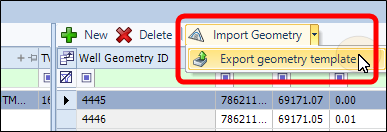
-
The Save As window opens.
-
Navigate to the location you want to save the template and enter a file name.
-
Click Save.
-
After a few seconds The template will open in Excel.
-
Review the column headers and delete the columns that are not relevant to your data.
-
Enter values in the associated columns for each new seismic item.
-
Save the file and close the spreadsheet.